To search
Softonic Rating:
Very good:8/10
License:
Evaluation
Added:
September 6, 2007
Publisher:
Website
File size:
3.5 MB
Downloads:
1,102
Cyril Roger

“Customize your cursor in style”

by Cyril Roger

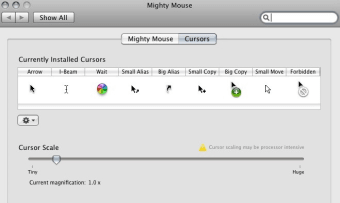
If you're tired of the same old cursor animations, Mighty Mouse is a nice way of varying things a bit on your Mac. The program sets up Application Enhancer, Unsanity's tool to manage their haxies, ie small apps like Mighty Mouse to tweak your desktop. There's no real difficulty in using the application. If you open it up via System Preferences you'll be able to see all the current icons you use for your different cursors. You can scale your cursor from tiny to huge, although be careful that choosing the latter will make your poor Mac's processor's work harder. We recommend scaling it to a size you feel comfortable with.

Unfortunately you won't be able to add new cursors directly from the program. Instead Mighty Mouse features a button that, once clicked, will take you straight to an Unsanity website, where you'll be able to choose from the 200 plus cursors on offer. We also liked the fact that you can create your own cursors and import them into Mighty Mouse.

Although it's a shame you can't add new cursors straight from the program window, Mighty Mouse is a nice little haxie that will definitely liven up your Mac's desktop.

Languages:

English

OS requirements for Mighty Mouse:

  • OS: Mac OS X

Minimum requirements:

  • Mac OS X 10.3 or later
Pros
  • Scale cursor
  • 200+ cursors to choose from online
  • Create and import your own cursors
Cons
  • Have to go to website to find new cursors
Did you like this review?
9 of 15 users liked it (60%)

Mighty Mouse Softonic Rating: 8Featured program

Softonic gives special recognition to software of exceptionally high quality. More information

From the publisher of Mighty Mouse

Mighty Mouse allows you to customize your cursors with style - and it does so on the fly, without modifying any system files! Moreover, it allows you to customize all kinds of cursors available in the system - Arrow, I-Beam, Alias, Copy, Move and the Wait cursor. You can animate any cursor and import pre-made ones available at our website. Edit the cursors with the simplicity of copy-paste and drag-and-drop, then hit Apply, and you got it!

Posts about Mighty Mouse in our blog

Mighty Mouse options

Mighty Mouse Options

Reviews for Mighty Mouse in other languages

Softonic Rating:Very good
7/10

User Rating

4 ratings
Usability
  • Currently 3/10.
Stability
  • Currently 3/10.
Installation
  • Currently 3/10.
Functionality
  • Currently 3/10.
Appearance
  • Currently 4/10.

Download stats

Are you the developer of Mighty Mouse?

If your program has received a Softonic rating, feel free to use the following award badge on your site or as part of any other promotional feature you may be putting together.

Mighty Mouse Softonic Rating

Click on the above text field to copy the necessary HTML to your clipboard and then paste it to your website. It will display your program's Softonic Rating and will link to your program page.

Any queries? Contact us if you want more info.

Close